

EBSCO eBooks - New App for Offline Reading
| by Gretchen Kenet

Beginning May 19, you will need to download the Thorium Reader to read EBSCO e-books offline.
Details
This change affects the downloading of full e-books from the EBSCO platform for offline reading. Adobe Digital Editions will no longer be compatible. This will not affect chapter downloads or reading full e-books online.
Getting Started
- Download the free Thorium Reader to your device.
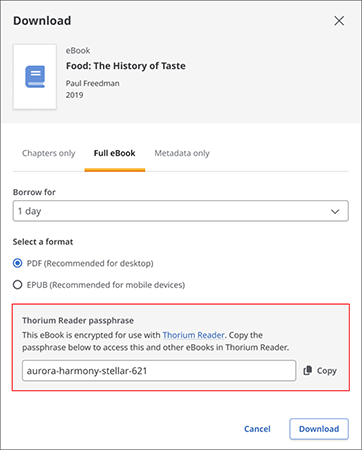
- Sign into EBSCO and initiate an e-book download. You will be prompted to select a borrowing period, format, and copy the Thorium Reader passphrase. [see image below]
- Open Thorium, click “Import Publication.” Navigate to the book in your Downloads folder, open the file, and enter the copied passphrase. You will only need to enter the passphrase the first time you download and open the e-book on that device.
- The e-book will then be available in Thorium on your device. You can open it at any time while offline until the loan period expires.
Frequently Asked Questions
Why is EBSCO switching to Thorium?
Thorium offers accessibility and functionality improvements. It is freely available and includes accessibility features such as text to speech with adjustable speed, support for multiple languages, options to change background color, font size, spacing and layout, and light and dark modes.
Can I access Thorium on my mobile device?
Thorium does not currently have a mobile app available, although mobile apps are on the roadmap for future development. The online reader will continue to function exactly as it does today for mobile browsers. Additionally, chapter PDFs can be downloaded and read on mobile devices.
How does the Thorium passphrase work?
- The passphrase will only need to be entered once per device.
- Each passphrase can be used on up to six devices simultaneously.
- If you forget your passphrase, you can regenerate it in the full-text download workflow.
Will my loans transition from Adobe Digital Editions to the Thorium app?
No, however, e-books already downloaded in Adobe Digital Editions can continue to be read there until the checkout expires, or you can download a new file into Thorium Reader instead.
What is the difference between PDF and EPUB when downloading e-books?
- An EPUB file is “reflowable,” meaning text, images, and other content automatically adjust to different screen sizes and devices. While this can make for a more comfortable and accessible reading experience, EPUB files do not have consistent or reliable page numbers.
- PDF files present documents in a fixed-layout format, meaning the overall layout will stay the same regardless of the screen size or device.
More Information
For more information about the Thorium Reader, please refer to the EBSCO FAQ.
If you have any questions, please contact us!
Media Contact
Gretchen Kenet is the Electronic and Continuing Resources Librarian.