

About Information Technology Services
Information Technology Services (ITS) delivers the technology that helps Middlebury teach, learn, work, and live together, on every campus and online.
We focus on making sure the tools you rely on are safe, reliable, and effective, so you can focus on your work, not on troubleshooting.
For support, most people should start with the Technology Helpdesk, and we’ll route your request to the right team. If you already partner regularly with a specific functional area, you’re always welcome to work with them directly.
How ITS Is Organized
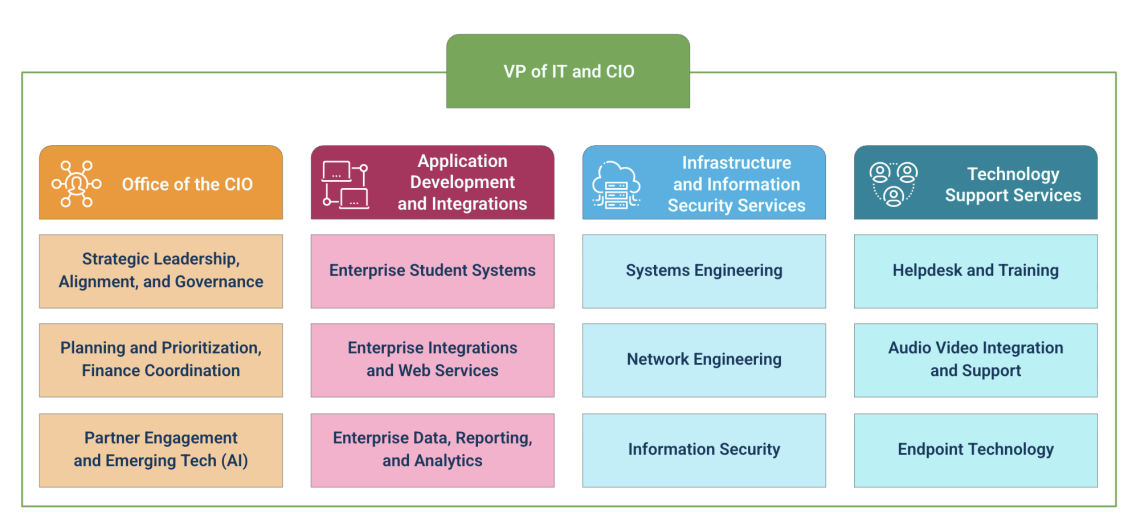
ITS is led by the Vice President for IT and Chief Information Officer (CIO) and organized into four functional areas. Together, these groups cover the full range of services across the ITS Mission Target, from foundational infrastructure and life/safety technologies to enterprise systems, departmental technologies, auxiliary and individual support.
Office of the CIO (OCIO)
The Office of the CIO (OCIO) ensures that ITS resources and operations are aligned with Middlebury’s institutional goals by providing mission-aware, community-centric strategic leadership and direction for the delivery of safe, reliable, and effective technology services. OCIO stewards the ITS Mission Target, coordinates technology planning, budgeting, and governance, and partners across the institution to prioritize investments and guide the evolution of Middlebury’s technology ecosystem.
Key responsibilities
- Strategic leadership, alignment, and governance
- Planning, prioritization, and coordination of ITS budgeting and contracts
- Partner engagement and exploration of emerging technologies (e.g., AI, HPC)
When to contact the Office of the CIO
- You’re exploring a new strategic technology initiative or long-term technology investment
- You have questions about technology governance, priorities, or roadmaps
- You want to discuss institution-wide impacts of emerging technologies
Application Development and Integration (ADI)
Application Development and Integration (ADI) designs, builds, and supports Middlebury’s enterprise applications and the integrations that connect them. This includes enterprise student systems that help students navigate their Middlebury journey, enterprise integration and web services that connect people to our information systems, as well as data, reporting, and analytics functions that help faculty and staff make informed decisions across the institution.
Key responsibilities
- Enterprise integrations and web services that connect systems behind the scenes so information flows smoothly and manual work is reduced, while also managing and supporting Middlebury’s institutional websites
- Enterprise data, reporting, and analytics that provide the institution with reliable data and insights
- Enterprise student systems that help students navigate their Middlebury journey and support the faculty and staff who work with them
When to contact ADI
- You need changes or enhancements to a core administrative or student system
- You’re considering a new system that must integrate with existing services
- You need institutional data, dashboards, or reports to support decision-making
Infrastructure and Information Security Services (IISS)
Infrastructure and Information Security Services (IISS) manages the core technology foundation that keeps Middlebury running, networks, servers, storage, and cloud services, so systems are available, reliable, and performant. The team also protects institutional data and systems through information security engineering, risk management, and security awareness education, helping the community teach, learn and work safely in an increasingly digital world.
Key responsibilities
- Systems engineering such as servers, storage, and cloud services
- Network engineering including wired and wireless networks, connectivity between campuses, and internet access
- Information security including security architecture, monitoring, incident response, risk management, and security awareness
When to contact IISS
- You’re planning a project that will significantly impact infrastructure or network usage
- You need guidance on information security, risk, or compliance
- You’re working with vendors or partners who require technical or security review
Meet the Infrastructure and Information Security Services team
Technology Support Services (TSS)
Technology Support Services (TSS) is the community’s first stop for hands-on help with technology. From our Helpdesk and training, to classroom and event audio-visual support, to the setup and lifecycle of computers and other devices, TSS works directly with students, faculty, and staff across all of our campuses to support the use of technology.
Key responsibilities
- Helpdesk and training including first-line support, troubleshooting, and technology training for faculty, staff, and students
- Audio-video integration and support: classroom technology, learning spaces, and event AV support across campuses
- Endpoint technology supporting computers, laptops, peripherals, and related lifecycle management
When to contact TSS
- You need help with your computer, account, or commonly used applications
- You’re planning a classroom, meeting, or event and need AV support or classroom technology guidance
- You have questions about device standards, replacements, or setup
Where to Start
If you’re ever unsure which area to contact:
- Start with the Technology Helpdesk (in person, by phone, email, or through the TDX Client Portal).
- The Helpdesk will triage your request and route it to the right ITS functional area.
- For ongoing projects or strategic conversations, they’ll help connect you with the appropriate director or manager within OCIO, ADI, IISS, or TSS.
This structure, and the ITS Mission Target behind it, helps us focus our time and resources on the services that are foundational to teaching, learning, and operations, while still being a collaborative partner for the full range of technologies used across Middlebury.