

ProQuest eBooks - New App for Offline Reading
| by Gretchen Kenet
Beginning October 14, you will need to download the Ebook Central App to read ProQuest ebooks offline.
Details
This change affects the downloading of full ebooks from the ProQuest platform for offline reading. Adobe Digital Editions will no longer be compatible. This will not affect chapter downloads or reading full ebooks online on the Ebook Central online reader.
Getting Started
- Sign into ProQuest Ebook Central through the library website and select an ebook to download.
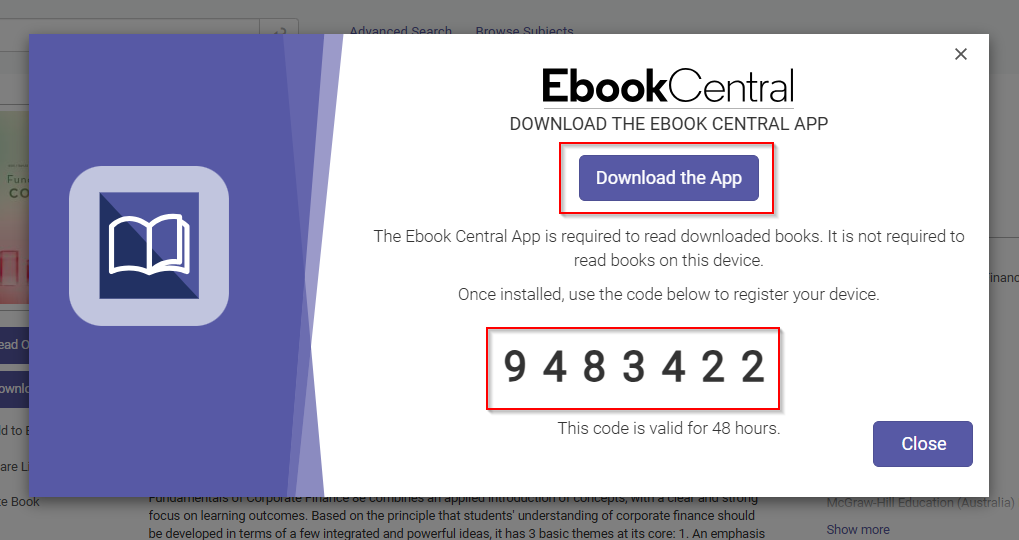
- You will be prompted to select your preferred loan length and then to download the Ebook Central App and copy a unique registration code [see image below].
- Once it finishes downloading, open the Ebook Central App and enter the registration code. When the book appears in the My Books section of the app, hover over the book and click Download to make it available locally.
Frequently Asked Questions
Why is ProQuest switching to the Ebook Central App?
The Ebook Central App offers accessibility and security improvements. It supports screen reader navigation as well as keyboard focus and navigation. Also supported: Adjusting text size, zooming, alignment with color contrast guidelines for readability, and various language settings.
Can I access the Ebook Central App on my mobile device?
Yes. The app is available on Windows, macOS, iOS, and Android. You can register up to 6 devices (subject to publisher/title restrictions).
Will my loans transfer from Adobe Digital Editions to the Ebook Central App?
Yes, all existing loans will automatically transfer to the new app.
What is the difference between PDF and EPUB when downloading ebooks?
- An EPUB file is “reflowable,” meaning text, images, and other content automatically adjust to different screen sizes and devices. While this can make for a more comfortable and accessible reading experience, EPUB files do not have consistent or reliable page numbers.
- PDF files present documents in a fixed-layout format, meaning the overall layout will stay the same regardless of the screen size or device.
More Information
For more information about the ProQuest Ebook Central App, please refer to the Clarivate FAQ.
If you have any questions, please contact us!
Media Contact
Gretchen Kenet is the Electronic and Continuing Resources Librarian.